Getting an error message on your meat thermometer can be frustrating, especially when you’re trying to cook a perfect meal. The Meat Thermometer ERR Message Fix is something many home cooks run into. It might seem tricky at first, but don’t worry!
This guide will show you a simple, step-by-step way to sort it out. We’ll cover what causes these errors and how to get your thermometer working again smoothly. Let’s get your cooking back on track.
Understanding Your Meat Thermometer’s ERR Message
This section is all about why that “ERR” message pops up on your meat thermometer. It’s a common signal that something isn’t quite right. Think of it like your oven telling you it needs attention.
Knowing what this message means is the first step to fixing it. We’ll break down the usual suspects behind this little error code.
What Does “ERR” Actually Mean?
When you see “ERR” on your meat thermometer’s display, it’s a general alert. It usually means the thermometer has detected a problem that prevents it from giving you an accurate reading. This isn’t a sign that your thermometer is broken forever.
It’s more like a “check engine” light for your cooking tool.
The exact meaning can vary slightly between different thermometer models. However, the core idea is the same: the device cannot communicate properly with its sensor or is receiving data that doesn’t make sense. This could be due to a variety of simple issues that are often easy to fix.
Common Reasons for ERR Messages
Several common issues can trigger an “ERR” message. The most frequent culprit is a bad connection between the probe and the thermometer unit. If the probe isn’t plugged in fully or is slightly loose, the thermometer can’t get a signal.
Another reason could be a damaged probe. If the wire is frayed or kinked, or if the probe tip itself is bent or broken, it might not be able to measure temperature correctly. Moisture getting into the probe or the main unit can also cause this error.
Batteries that are low or have a poor connection are also frequent offenders.
- Loose Probe Connection: Sometimes, the simplest fix is the right one. The probe that measures the food’s temperature needs to be securely attached to the main thermometer body. If it’s not pushed in all the way, or if the port it plugs into is a bit dirty, it can lead to an error. This is especially true for models with detachable probes. A secure fit ensures a clear electrical path for the temperature signal to travel.
- Damaged Probe or Wire: The probe and its connecting wire are delicate. If they’ve been bent too sharply, accidentally cut, or subjected to extreme heat or moisture, the internal wiring can be damaged. This damage disrupts the flow of information to the thermometer. Even a small break in the wire can cause the “ERR” message to appear, as the thermometer receives no signal or an inconsistent one.
- Battery Issues: Like any electronic device, meat thermometers rely on batteries. If the batteries are running low, they might not provide enough power for the thermometer to function correctly, leading to errors. Also, if the batteries are inserted incorrectly or if the battery contacts are dirty or corroded, this can prevent a good electrical connection, similar to a loose probe.
Troubleshooting Your Meat Thermometer ERR Message
Now that we know what might be causing the “ERR” message, let’s look at how to fix it. This section will guide you through a series of checks. We’ll start with the easiest things to try and move to slightly more involved steps.
Most of the time, you can get your thermometer working again without any special tools.
Step-by-Step Solutions
The first thing to do is always check the simplest things. Often, the problem is just a loose connection or a need for a reset. Follow these steps in order.
- Check the Probe Connection: Unplug the probe from the thermometer unit. Make sure there’s no debris in the port or on the probe’s connector. Then, plug it back in firmly until it clicks or feels secure. Try turning the thermometer on again.
- Inspect the Probe and Wire: Carefully examine the entire length of the probe and its wire. Look for any visible damage like cuts, kinks, or bends. If the probe tip looks bent or damaged, be gentle when trying to straighten it if possible, but avoid forcing it.
- Perform a Reset: Many electronic devices have a reset function. For some thermometers, this might mean removing the batteries and leaving them out for a few minutes before re might be a specific reset button. Check your thermometer’s manual for instructions.
- Test in Different Conditions: Sometimes, extreme temperatures can affect a thermometer. If you’re trying to measure something very hot or very cold, ensure the thermometer is designed for that range. Also, avoid exposing the thermometer unit to direct heat or excessive moisture.
When to Consider the Probe or Thermometer Faulty
If you’ve gone through all the troubleshooting steps and the “ERR” message persists, it might be time to consider if a part of the thermometer is actually faulty. This doesn’t mean you have to throw it away immediately, but it helps you decide on the next steps.
If you have a thermometer with a detachable probe, try using a different, compatible probe if possible. If a new probe works, you’ve found the problem. If it doesn’t, the issue likely lies with the main thermometer unit itself.
Conversely, if your probe is not detachable, and you’ve ruled out connection and battery issues, the probe might be internally damaged beyond repair.
Maximizing Your Meat Thermometer’s Lifespan
Keeping your meat thermometer in good shape means it will last longer and give you reliable readings every time. Proper care prevents common issues that lead to error messages. This section offers practical advice on how to treat your thermometer so it serves you well for years.
Best Practices for Care and Maintenance
Treating your meat thermometer with care is key to avoiding future problems. This means paying attention to how you use and store it. Simple habits can make a big difference in its performance and longevity.
- Clean After Every Use: After cooking, always clean the probe. Use warm, soapy water and a soft cloth. Avoid abrasive cleaners or scrubbing pads, as they can scratch the probe’s surface or damage its coating. Make sure to dry the probe thoroughly before storing it.
- Avoid Extreme Temperatures: While the probe is designed to go into hot food, the main thermometer unit is not. Do not leave the thermometer body sitting on a hot grill, in a hot oven, or in direct sunlight for extended periods. Extreme heat can damage the electronics. Similarly, avoid submerging the main unit in water.
- Store Properly: When not in use, store your thermometer in a safe place. Many come with protective sleeves or cases. Keep the probe and wire from getting bent or kinked. A drawer or a dedicated cooking tool organizer is a good spot.
- Handle with Care: The probe is a sensitive instrument. Avoid dropping the thermometer or banging the probe against hard surfaces. Gentle handling ensures the delicate sensor inside the probe remains intact and functional.
Understanding Probe Types and Durability
Not all meat thermometer probes are created equal. The material and design can affect how durable they are and how they perform. Knowing about different probe types can help you understand why some might be more prone to damage.
Most probes are made of stainless steel, which is good for food safety and durability. Some higher-end models might use more robust materials or have thicker casings for the wire. The length of the probe also matters; a longer probe can reach the center of larger roasts more easily.
The connection point where the wire meets the probe is often a weak spot. If this area is not well-sealed, moisture can seep in over time, causing corrosion and leading to an “ERR” message. Wireless probes also have their own set of potential issues, often related to battery life or signal interference, but they eliminate the physical connection problem.
When a New Thermometer is the Best Solution
Sometimes, despite your best efforts, a meat thermometer might reach the end of its useful life. If troubleshooting doesn’t work, and the thermometer is old or has suffered significant damage, it might be more cost-effective and reliable to buy a new one. Modern thermometers offer many features that can make cooking easier and more accurate.
Consider the type of cooking you do most often. If you frequently cook large roasts, a thermometer with a long probe and fast read times is beneficial. For quick tasks like grilling burgers, a speedy digital thermometer is ideal.
Investing in a quality replacement can prevent future frustrations.
Advanced Troubleshooting and Specific Models
While the general troubleshooting steps cover most “ERR” messages, some thermometers have specific quirks. This section touches on more advanced checks and considers how different brands might handle errors. It’s about getting a little more specific to solve persistent problems.
Dealing with Brand-Specific Errors
Different manufacturers design their thermometers with unique internal systems. This means an “ERR” message on one brand might be resolved slightly differently than on another. Your best resource is always the user manual that came with your thermometer.
It often has a troubleshooting section that lists specific error codes and their meanings.
For example, some thermometers might use “ERR 1” or “ERR 2″ to indicate different types of problems. If your manual is lost, a quick search online for ” ERR message” can often yield helpful results from forums or the manufacturer’s website.
For instance, a popular brand might display “ERR” if the probe temperature reads below -40°F (-40°C) or above 572°F (300°C). This is because the internal components and wiring are not designed to operate accurately outside this range. If you are trying to measure something extremely cold or hot, the thermometer might show an error rather than an inaccurate reading.
Troubleshooting Wireless Thermometers
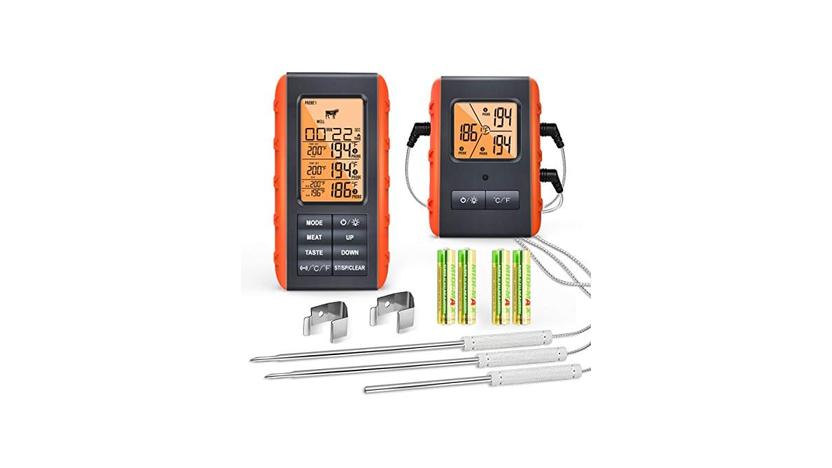
Wireless meat thermometers offer convenience but can introduce new troubleshooting scenarios. “ERR” messages on these devices might relate to the wireless connection itself. This could be due to low batteries in either the transmitter (probe unit) or the receiver (display unit).
Interference from other wireless devices or physical obstructions between the transmitter and receiver can also cause connection issues. Try moving the receiver closer to the transmitter or ensuring there are no large metal objects or appliances between them. Sometimes, simply re-pairing the transmitter and receiver according to the manual’s instructions can resolve the problem.
- Battery Check for Wireless Units: For wireless thermometers, both the probe/transmitter unit and the display/receiver unit often have batteries. Low batteries in either component can lead to communication errors. Always check and replace batteries in both parts if you encounter an “ERR” message.
- Signal Interference: Wireless signals can be affected by other electronic devices in your home, such as microwaves, Wi-Fi routers, or cordless phones. If you’re experiencing connection issues, try turning off other nearby wireless devices temporarily to see if that resolves the “ERR” message.
- Re-pairing the Devices: Many wireless thermometers require you to pair the probe with the main unit. If this connection is lost, an error message might appear. Consult your manual to find out how to re-establish the connection between your thermometer’s components.
Contacting Customer Support
If all troubleshooting attempts fail, and your thermometer is still under warranty, contacting the manufacturer’s customer support is a good next step. They may be able to offer more specific advice or arrange for a repair or
Customer support can be a valuable resource. They understand the nuances of their products and can guide you through more technical fixes or confirm if the unit is indeed defective. Having your purchase receipt ready can also expedite the process if a warranty claim is needed.
Frequently Asked Questions
Question: My meat thermometer shows “ERR.” What is the first thing I should do?
Answer: The first thing you should do is check that the probe is securely plugged into the thermometer unit. Unplug it and plug it back in firmly. Also, check for any visible damage to the probe or its wire.
Question: Can I fix a meat thermometer probe if the wire is damaged?
Answer: Minor kinks in the wire can sometimes be gently straightened, but if the wire is cut, frayed, or the internal conductors are visibly damaged, it’s usually not repairable and the probe will need to be replaced or the entire thermometer unit may need replacing.
Question: My digital meat thermometer is not turning on, only showing “ERR.” What could be wrong?
Answer: If your thermometer isn’t turning on and just shows “ERR,” the most common cause is low or dead batteries. Try replacing the batteries with fresh ones, ensuring they are inserted correctly. Also, check the battery contacts for any dirt or corrosion.
Question: I got an “ERR” message after washing my meat thermometer. Did I break it?
Answer: It’s possible. Most meat thermometer probes are water-resistant, but the main unit with the display is usually not waterproof. If moisture got into the main unit, it can cause an “ERR” message.
Make sure to dry the unit thoroughly and let it air dry completely before trying to turn it on again.
Question: How often should I replace the batteries in my meat thermometer?
Answer: Battery life varies greatly depending on the model and how often you use it. If you notice slower response times or start seeing error messages, it’s a good indicator to replace the batteries. For frequently used thermometers, consider replacing them every 6-12 months as a preventative measure.
Conclusion
Dealing with a “Meat Thermometer ERR Message Fix” is usually quite straightforward. By checking the probe connection, inspecting for damage, and ensuring fresh batteries, you can often resolve the issue quickly. Proper care will help your thermometer last longer.
Enjoy your perfectly cooked meals!